
Survive yourself — Digital inheritance
Published:
This article is the translation of an inspiring article from Riccardo Palombo, an italian youtuber and tech influencer. Be sure to check him out!
The following are hints and good practices about personal data management, ensuring a certain level of security without ruining the user experience. In particular, the aim is to allow someone to access our data when we will be gone forever, or in case of theft, permanent damage or loss of any of your devices. Indeed, have you ever wondered about what would happen if a car runs over you? What would happen if thieves steal your workstation/notebook/phone/tablet? What if you lose them somewhere in the world? What if they fall into a river?
Are you able to rebuild everything up?
How can you organize (and secure) your digital inheritance?
Prevention
It’s fine, bad things happen, but maybe we can do something in order to not make them become tragic things.
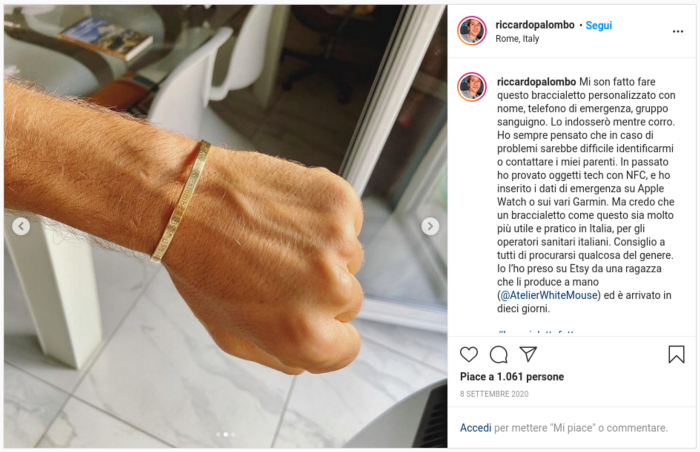
- Wear an ID bracelet with name, surname, emergency phone and clinic details when you go for a walk or go out without your smartphone with you. It does not have to be a smart band: a simple piece of metal, plastic or leather will do the job. Whoever is with you, or finds you passed out, will need to know basic info about you.
- Setup the emergency mode on your Android or iOS phone with emergency contacts and medical records.
- Setup all the procedures provided by online services for inactive account management. Google allows you to delegate complete access to your account to a user you consider trustworthy. Facebook, Twitter and other socials have similar systems to ensure that data can be accessed in case of fatalities or long period of inactivity.
- Setup Find my Device on your device, if available. This will allow you to deactivate it remotely.
Online Accounts
- Password manager. Choose an open-source one, multi-platform, allowing delegated access to other accounts and capable of exporting the full list of password (obviously encrypted). BitWarden is a good example (premium version is preferred for U2F support, 10$/year) Note: it goes without saying that master password should not be written down somewhere but remembered, and this should not result in a less secure password! Moreover, it should be taken down in shorthand, e.g. put inside an image, video or whatever feels “secure” for you. This way, you can create a sort of backup of this password too.
- Prefer Authy over Google Authenticator because it allows you to have an encrypted cloud backup and it allows multiple devices access. Google Authenticator does not provide recovery or reset processes, so this means you will lose all your accounts if anything bad happens to the device it is running on.
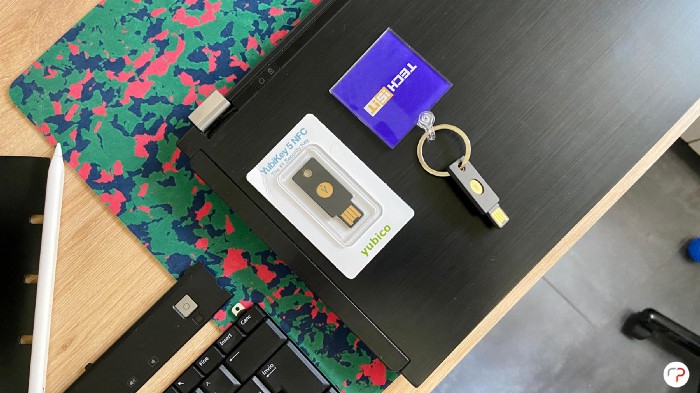
- A pair of Yubikey to be activated on your most sensible accounts, e.g. Google, money exchanges, home banking, password manager. They must be identical, one being the backup of the other. This allows you to bring one along with you, while leaving the other in a secured vault.
- If possible, do not use your phone number as the target for authentication code. This advice is mainly inspired from a recent experience with an italian provider: a data breach of your provider can lead to a disaster for your accounts’ security
Mandatory
- Encrypt the whole disk on which your operating system is running (not just a partition or the bootloader), both workstations and laptops. Without this, anyone who has physical access to your machines will have access to all your data, browser profiles and online accounts. Even if your laptop’s SSD is board-mounted, this does not mean it is safe: reading data directly from memory module has become easy and cheap.
- Prepare a USB pendrive containing an encrypted volume produced by VeraCrypt. This volume must be unlocked with VeraCrypt software and password should be split in two different locations. Inside of it you should store Authy master password, useful to recover every account backup, BitWarden’s backup, encrypted during download, smartphone unlocking code, allowing fast access to all of those accounts inside it (we all know that most of our accounts are placed here). The USB stick must be stored in a physically secure place.
- Bonus idea: in order to ease the process of recovery, you can create a tutorial video explaining all the steps needed to get full access to our accounts. This is a lot less secure, but allows you to give your digital inheritance to a not-so-digital relative.
Routine
- Running your browser on a Docker container during critical activities, e.g. home banking, money exchange. This container should start its new session for every access and it should not share files with the machine it runs on. This habit is quicker to put into practice than running a virtual machine and it is easy to be set up on any operating system. The main goal is not having a completely secured navigation (in facts, this can never happen), but creating a clean profilo and a dedicated access for certain kind of operation. Any drop of performance should be created by the container if it is run on a recent mid-level workstation. Alternative idea: save browser profile on a USB stick instead of main disk; this way, removing the stick, everything will be erased quickly. This solution is obviously less secure.
- Clean re-install your operating system every X weeks or months, depending on your situation, use case and available time. During this, prefer less common operating systems, embedded or self-tweaked ones: the main goal is being the only one who can manage to properly go through your machine. Bonus idea: creating a bootloader file that runs your real operating system on a USB stick. Without it, it will simply run a standard OS. This needs a little bit of work but here is a guide.
- Using a dedicated hardware for most critical operations. For example, you could use a secondary machine when doing day trading, maybe set it up with all the hints above and use only wired network; wireless card should be disabled from BIOS or physically removed from the motherboard. If having two workstations is not an option for you, there are two possible alternatives: using a Linux LIVE distro run on a USB stick, e.g. Tails; or using a dedicated partition with a dedicated OS, e.g. Qubes OS
- Use a dedicated email for those accounts that you want to be particularly secured.
- Cover your webcam physically, if not disabled from BIOS; do not rely on the operating system switch. Do the same with the integrated microphone.
Conclusions
These were all the hints and ideas provided by Riccardo to survive ourselves. A final remark is about digital will: it could reside on a blockchain with a smart contract and, when certain circumstances are met, it would activate a certain process created by the issuer in which you give all your accounts to whichever account you want.
As already mentioned, this was the translation of an italian youtuber’s article, Riccardo Palombo. It was an inspiring reading for me and I hope that this translation was too!